
Domain Takedowns guide
Requesting Takedowns
Section titled “Requesting Takedowns”Domain Takedowns help security teams and brand protection analysts request removal of malicious domains that impersonate their brand, distribute malware, or engage in phishing campaigns. This feature streamlines the takedown process by compiling evidence, tracking progress, and coordinating with hosting providers and registrars.
As an analyst, takedowns are essential for protecting your brand reputation and reducing the attack surface. By systematically removing malicious domains, you prevent attackers from using them to target your customers, employees, or partners.
What you can do
Section titled “What you can do”- Submit takedown requests: Request removal of malicious domains directly from lookup results
- Track progress: Monitor takedown status through a five-stage workflow from submission to completion
- View detailed evidence: Access comprehensive infrastructure data including DNS records, registration metadata, and geolocation
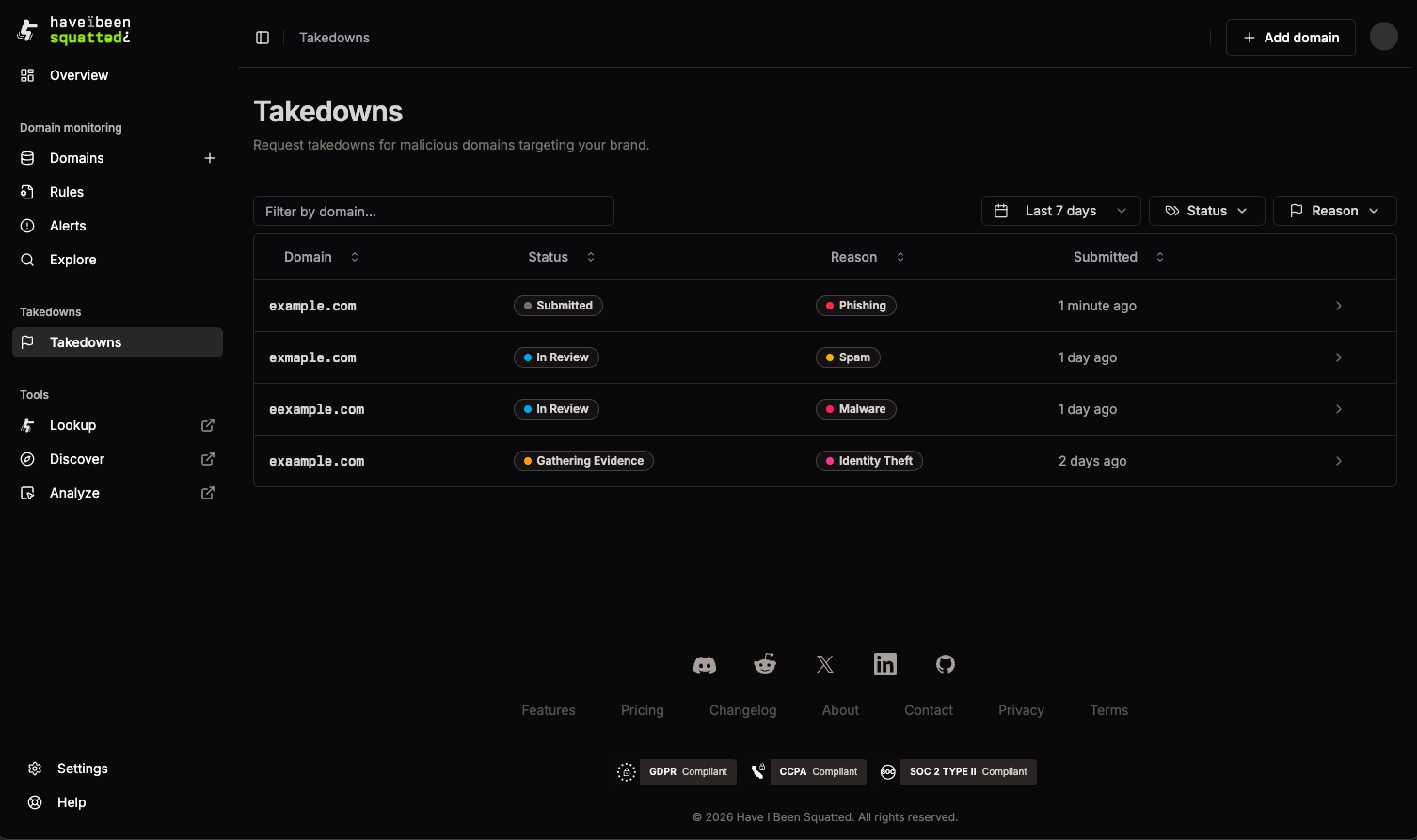
- Filter and search: Organize requests by status, reason, domain name, or time range
Submitting a request
Section titled “Submitting a request”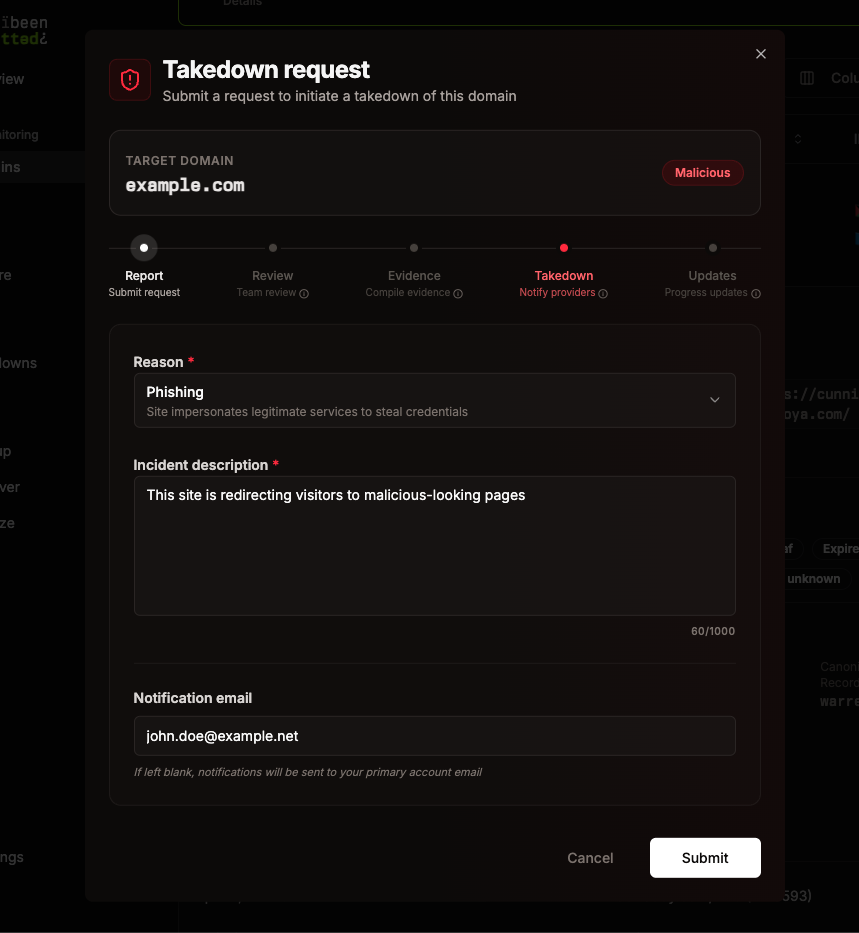
Takedown requests can be initiated directly from Lookup results or Alerts. When viewing suspicious domains, click the Takedown button to open the request form.
Request form fields
Section titled “Request form fields”-
Reason (required): Select the primary reason for the takedown:
- Phishing: Site impersonates legitimate services to steal credentials
- Trademark Infringement: Unauthorized use of registered trademarks
- Malware Distribution: Site distributes malicious software
- Identity Theft: Site attempts to steal personal information
- Spam/Scam: Site promotes fraudulent schemes or spam
- Other: Other security or legal concerns
-
Incident description (required): Provide specific evidence, similar domains, or an impact assessment (max 1000 characters)
-
Notification email (optional): Email address to receive status updates. If left blank, notifications are sent to your primary account email
Takedown process timeline
Section titled “Takedown process timeline”The request form shows the five-stage takedown workflow:
- Report: Submit your request with domain and evidence
- Review: Our team reviews the request and may request clarifications
- Evidence: We compile evidence required for the takedown (DNS records, registration data, screenshots)
- Takedown: We notify hosting and infrastructure providers requesting removal
- Updates: You receive progress updates via email as the takedown progresses
After submission, you’ll receive a confirmation and can track the request’s progress in the takedowns list.
Detail view
Section titled “Detail view”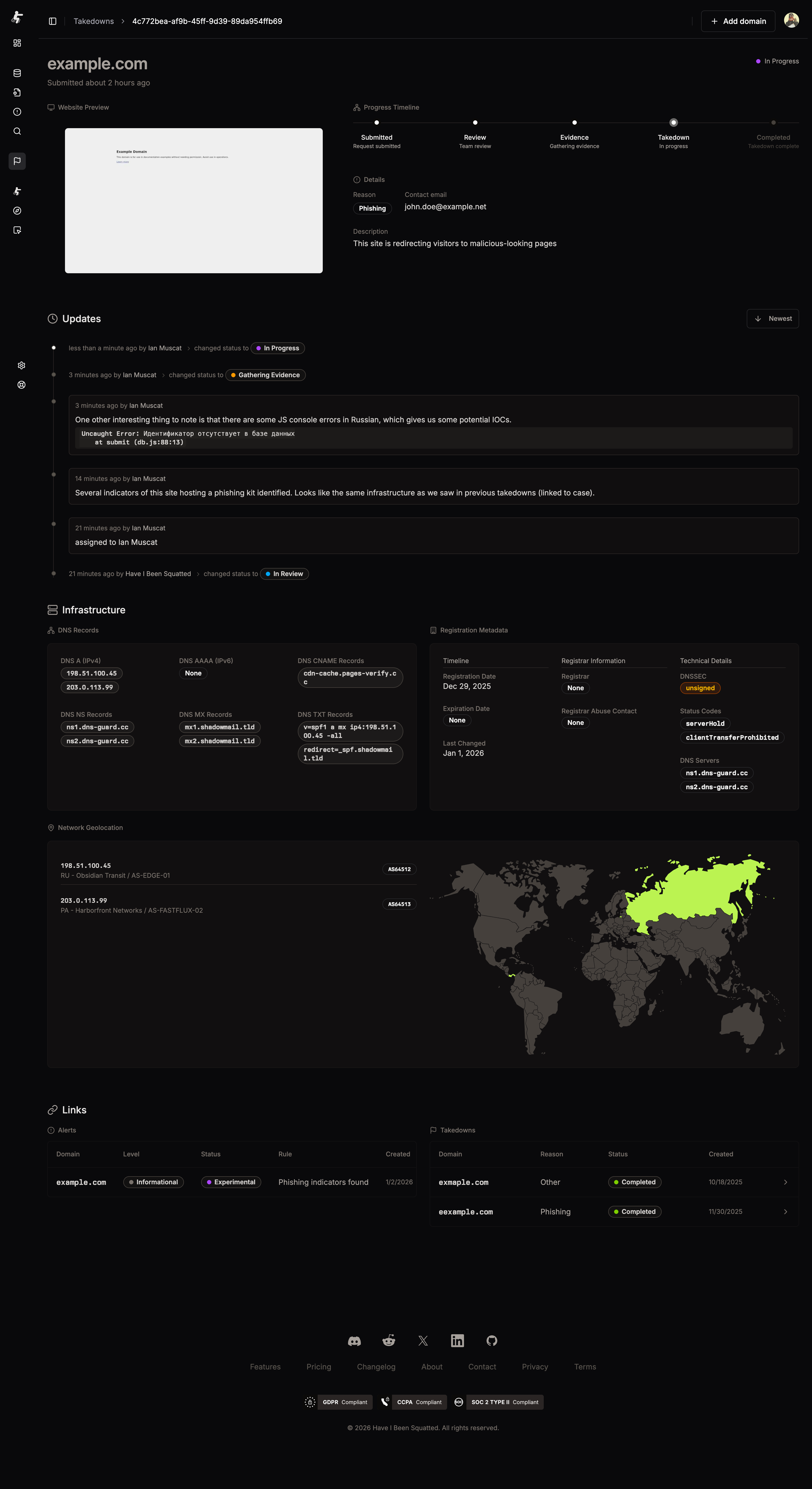
The detail view provides comprehensive information about each takedown request:
Website preview
Section titled “Website preview”A screenshot of the target domain helps verify the malicious content and provides visual evidence for the takedown request.
Progress timeline
Section titled “Progress timeline”A visual timeline shows the current stage of the takedown process, with highlighted steps indicating completed stages and the current active stage.
Request details
Section titled “Request details”- Reason: The selected takedown reason (Phishing, Trademark, etc.)
- Description: Your submitted incident description
- Contact email: Email address receiving status updates
- Tags: Public tags associated with the takedown (e.g., campaign identifiers, threat actor names)
Updates section
Section titled “Updates section”Analyst notes and status change notifications appear chronologically, showing when the takedown moved between stages and any additional context provided by the team.
Infrastructure section
Section titled “Infrastructure section”Comprehensive infrastructure data compiled automatically:
DNS records
Section titled “DNS records”- DNS A (IPv4): IPv4 addresses associated with the domain
- DNS AAAA (IPv6): IPv6 addresses if present
- DNS CNAME Records: Canonical name records
- DNS NS Records: Nameservers responsible for the domain
- DNS MX Records: Mail exchange servers
- DNS TXT Records: Text records including SPF, DKIM, and other metadata
Registration metadata
Section titled “Registration metadata”- Timeline: Registration date, expiration date, and last changed date
- Registrar Information: Registrar name, IANA ID, and abuse contact email
- Technical Details: DNSSEC status, status codes, and DNS server names
Network geolocation
Section titled “Network geolocation”- IP Addresses: All IPs associated with the domain with ASN information
- Geographic Map: Visual map showing the geographic distribution of infrastructure
- ASN Details: Autonomous System Numbers and organization names
Links section
Section titled “Links section”- Alerts: Related alerts that triggered or are associated with this takedown
- Takedowns: Other takedown requests for related domains or campaigns
Takedown status flow
Section titled “Takedown status flow”Takedowns progress through five distinct stages:
- Submitted: Your request has been received and is queued for review
- In Review: Our team is evaluating the request and evidence
- Gathering Evidence: We’re compiling DNS records, registration metadata, and other supporting documentation
- In Progress: Takedown notices have been sent to hosting providers and registrars
- Completed: The takedown has been successfully processed (domain removed or access revoked)
Each status change triggers an email notification to keep you informed of progress. You can also view detailed status updates in the takedown detail page.
Workflow tips
Section titled “Workflow tips”1. When to submit a takedown
Section titled “1. When to submit a takedown”- Submit requests for domains actively impersonating your brand or services
- Prioritize domains with recent registration dates and active infrastructure
- Focus on domains classified as phishing, malware, or trademark infringement
- Consider the domain’s threat level and potential impact on your organization
2. Tracking progress
Section titled “2. Tracking progress”- Monitor status updates in the detail view for analyst notes
- Filter by status to focus on active takedowns (In Progress, Gathering Evidence)
- Review completed takedowns to identify patterns or recurring threats
3. Managing multiple requests
Section titled “3. Managing multiple requests”- Use search to find specific domains across all your takedowns
- Filter by reason to group similar threat types (e.g., all phishing requests)
- Filter by status to prioritize follow-up on stalled requests
- Link related takedowns to track coordinated campaigns
Integration with other features
Section titled “Integration with other features”Lookup results
Section titled “Lookup results”Takedown requests are initiated directly from lookup results. When viewing suspicious domains, the Takedown button appears in the expanded row details. The request automatically includes the domain’s current DNS records, registration metadata, and screenshot.
Alerts
Section titled “Alerts”Takedowns can be linked to alerts, creating a complete picture of threat detection and response. When an alert triggers for a malicious domain, you can quickly submit a takedown request and link it to the alert for tracking.
Classification data
Section titled “Classification data”Use domain classification results (phishing, malware, etc.) to prioritize takedown requests. Domains classified as high-risk threats should be submitted for takedown immediately.