
Takedowns guide
Takedowns helps security teams request removal of malicious domains from the same workflows used for lookup review and alert triage. A request creates a tracked case with a reason, incident description, contact email, linked evidence, analyst updates, and infrastructure context.
Use Takedowns for domains that actively impersonate a brand, distribute malware, run phishing campaigns, or create another concrete security or legal risk. It is a case-management and evidence workflow, not an automatic guarantee that a registrar or hosting provider will remove a domain.
What the feature supports
Section titled “What the feature supports”- Submit takedown requests: Start a request from Lookup results or Alerts for a specific suspicious domain
- Track status: Follow the request through submission, review, evidence gathering, provider notification, and completion
- Review updates: Read status changes and analyst notes on the takedown detail page
- Filter and export: Search by domain, filter by time range, status, or reason, and export visible cases as comma-separated values (CSV)
- Inspect evidence: Review the website preview, Domain Name System (DNS) records, registration metadata, network geolocation, and linked alerts or takedowns
Starting a request
Section titled “Starting a request”Takedown requests start from monitored-domain lookup results or Alerts. Select Takedown on a suspicious domain to open the request form.
The button is available to organization administrators when Takedowns is enabled for the organization. It is disabled for domains marked Owned or False Positive, because those labels indicate that a takedown is not appropriate for that result.
Request fields
Section titled “Request fields”- Reason (required): Select the primary legal or security reason. Supported reasons are Phishing, Trademark Infringement, Malware Distribution, Identity Theft, Spam/Scam, and Other.
- Incident description (required): Add specific evidence, related domains, observed behavior, or impact. The field is limited to 1000 characters.
- Notification email (optional): Set the address that should receive status updates. If left blank, notifications go to the primary account email.
The request form shows the operational sequence before submission:
- Report: Submit the request for the target domain.
- Review: The Have I Been Squatted team reviews the request and may ask for clarification.
- Evidence: The team compiles evidence needed for the takedown.
- Takedown: Hosting, registrar, or infrastructure providers are notified.
- Updates: Progress updates are sent by email and recorded on the detail page.
After submission, the domain is marked as malicious if it does not already have tags. Matching alerts from the lookup context are linked to the takedown automatically.
Takedowns list
Section titled “Takedowns list”Open Takedowns from the application sidebar to review requests.
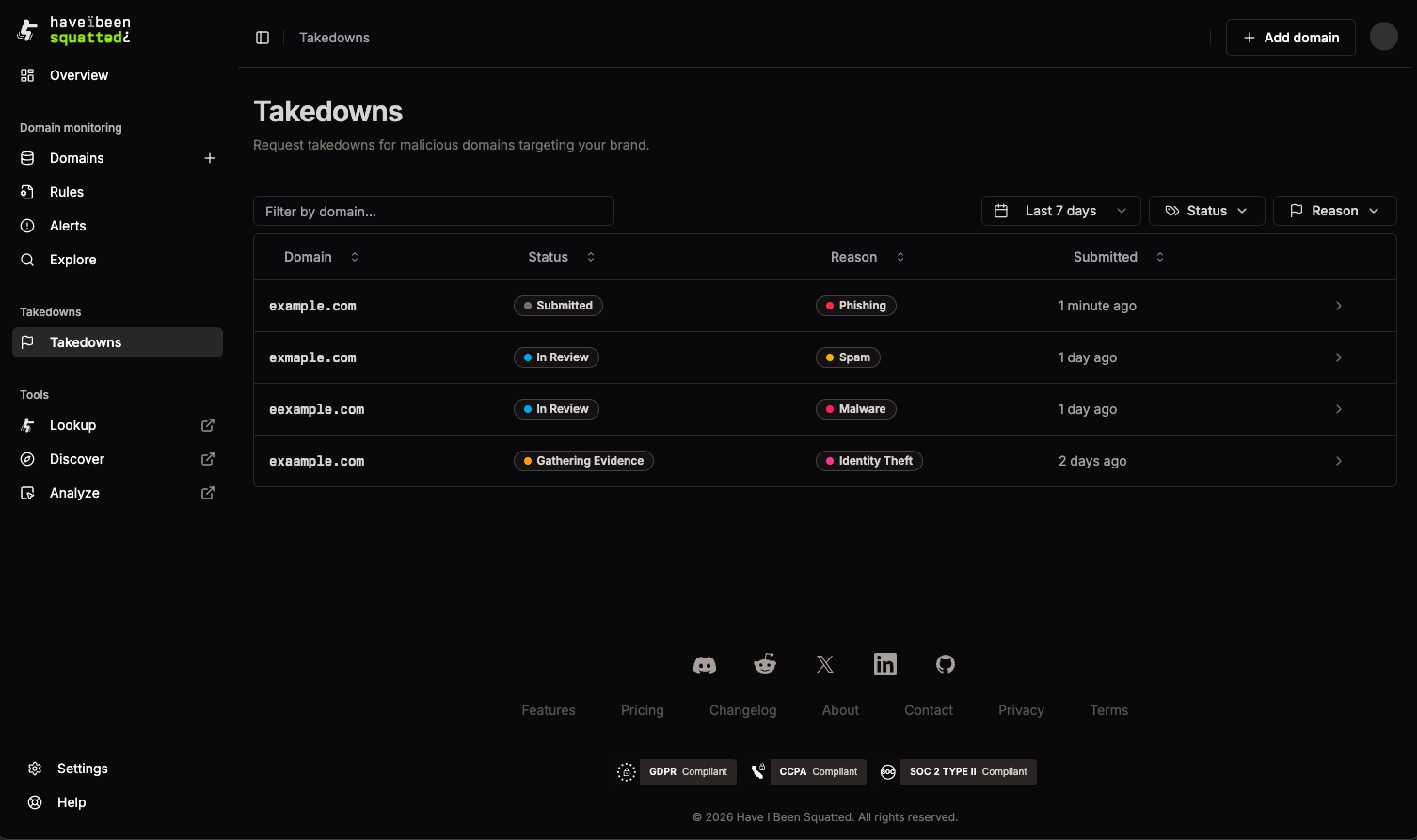
The list shows:
- Domain: Target domain for the request
- Status: Current request state
- Reason: Submitted takedown reason
- Submitted: Relative submission time
Use Filter Takedowns… to search by domain. Use the time range selector, Status, and Reason filters to narrow the table. The default time range is the last 90 days. Select Export to download the currently loaded cases as CSV.
Selecting a row opens the takedown detail view.
Detail view
Section titled “Detail view”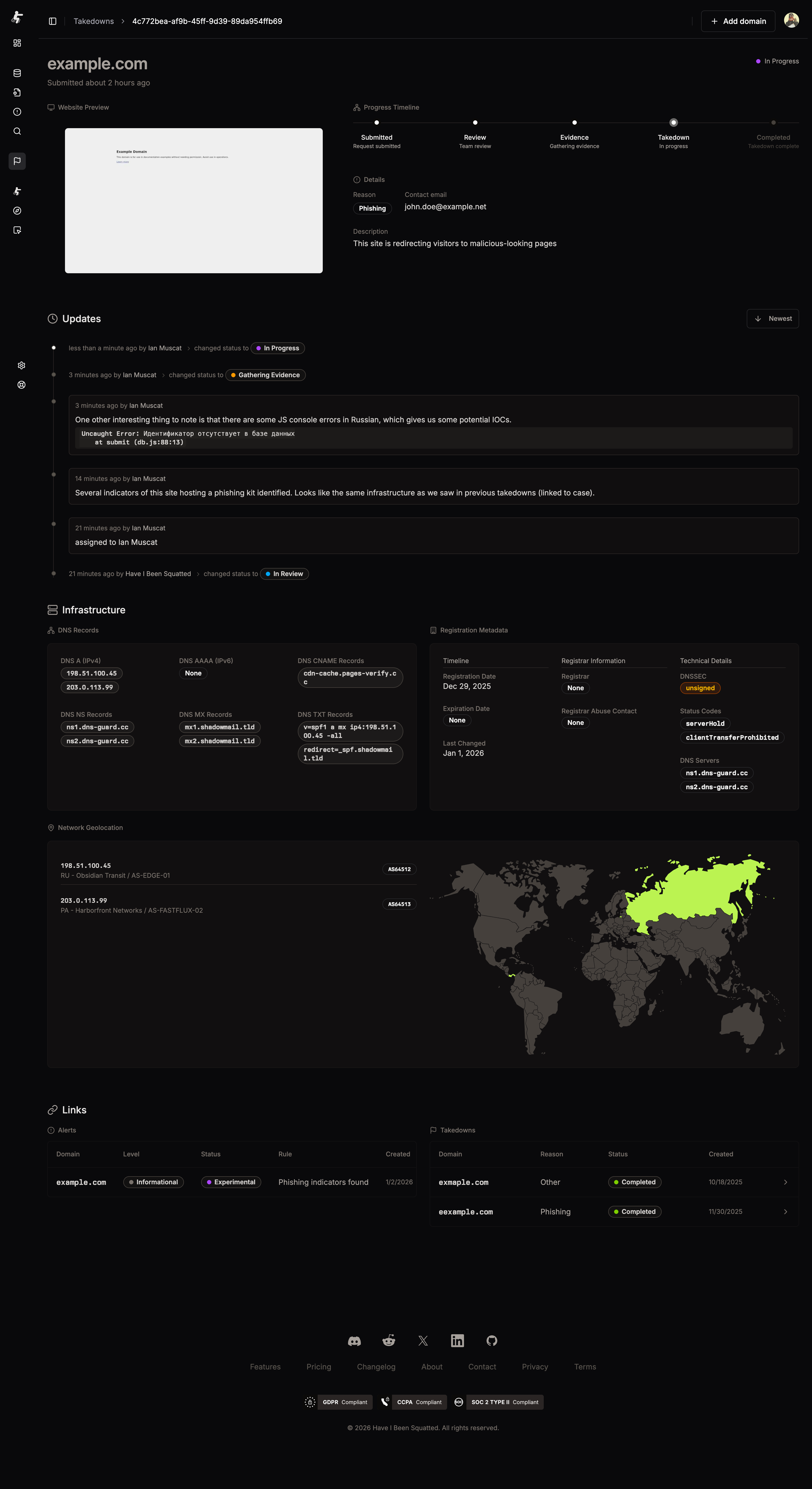
The detail view is the case record for a request.
Header and preview
Section titled “Header and preview”The header shows the domain, current status, and submission time. The website preview captures the target domain when a screenshot is available, so the case keeps visual evidence of the abuse page.
Progress timeline
Section titled “Progress timeline”The timeline uses five steps:
- Submitted: Request submitted
- Review: Team review
- Evidence: Gathering evidence
- Takedown: In progress
- Completed: Takedown complete
Status chips elsewhere in the app use the expanded labels Submitted, In Review, Gathering Evidence, In Progress, and Completed.
Details
Section titled “Details”The details panel shows the submitted reason, contact email, and incident description.
Updates
Section titled “Updates”The Updates section records status transitions and analyst notes. Notes can include short Markdown snippets and code blocks. Use the Newest / Oldest toggle to change the sort order.
Infrastructure
Section titled “Infrastructure”The Infrastructure section collects supporting technical evidence:
- DNS Records: A, AAAA, CNAME, NS, MX, and TXT records
- Registration Metadata: Registration date, expiration date, last changed date, registrar, registrar abuse contact, DNSSEC status, status codes, and DNS servers
- Network Geolocation: IP addresses, Autonomous System Number (ASN) data, organizations, countries, and a map of observed infrastructure locations
The Links section connects the case to related Alerts and other Takedowns. Use these links to move between detection context and response history for related domains or campaigns.
Status flow
Section titled “Status flow”Takedowns progress through these statuses:
- Submitted: The request has been received.
- In Review: The team is reviewing the request and evidence.
- Gathering Evidence: Supporting infrastructure, registration, screenshot, and alert context is being compiled.
- In Progress: Notices or escalation steps are underway with relevant providers.
- Completed: The takedown case has reached its outcome and is no longer active.
Each status change appears in the detail view. Status updates can also be sent by email to the configured notification address.
Working with cases
Section titled “Working with cases”Prioritize requests
Section titled “Prioritize requests”Submit requests when the domain is active, impersonates the monitored brand, hosts phishing or malware, or creates clear legal or security exposure. Recent registrations, active DNS, working web content, and high-risk classifications make a request easier to action.
Track active work
Section titled “Track active work”Use the status filter to focus on In Review, Gathering Evidence, and In Progress cases. Use the detail view for analyst notes, linked alerts, and provider-facing evidence.
Group related activity
Section titled “Group related activity”Search by domain, filter by reason, and use links to follow related domains or repeated infrastructure without duplicating evidence across every request.