

Reports guide
Reports package monitored-domain coverage, alerting, lookup, and takedown activity into an on-demand Portable Document Format (PDF) file. They are intended for recurring security reviews, compliance evidence, and stakeholder updates.
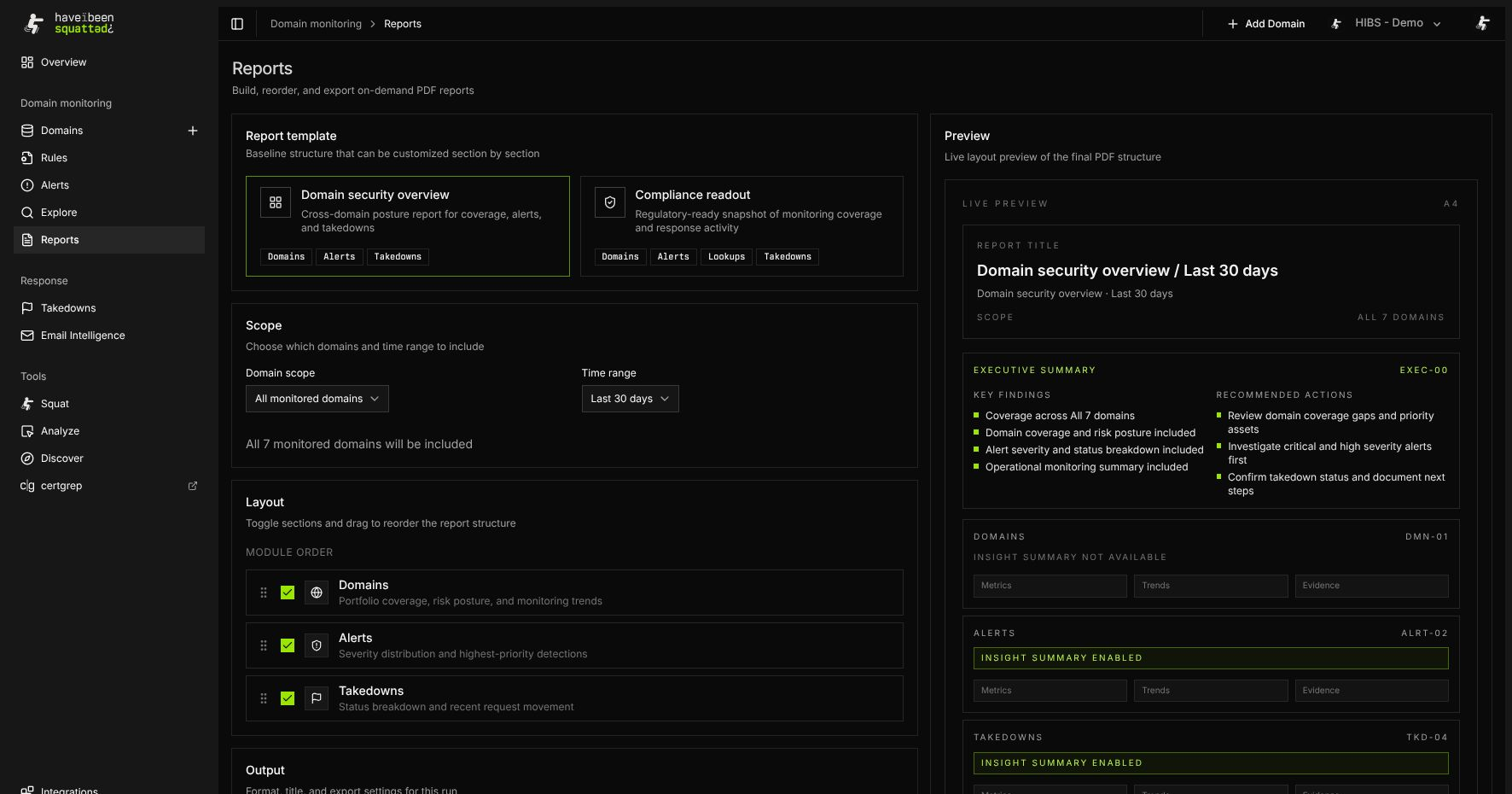
Report templates
Section titled “Report templates”Open Domain monitoring > Reports and choose a template.
The current templates are:
| Template | Purpose | Default sections |
|---|---|---|
| Domain security overview | Cross-domain posture report for coverage, alerts, and takedowns. | Domains, Alerts, Takedowns |
| Compliance readout | Regulatory-ready snapshot of monitoring coverage and response activity. | Domains, Alerts, Lookups, Takedowns |
The selected template controls which sections are available. If no custom section list is supplied, all sections allowed by the template are included.
Scope and time range
Section titled “Scope and time range”Choose whether the report should include all monitored domains or a selected subset. Selected scope requires at least one matching monitored domain.
Available time ranges are:
- Last 7 days
- Last 30 days
- Last 90 days
- Last 180 days
- Last 12 months
The generated report uses organization data that falls inside the selected time range and domain scope.
Layout and export
Section titled “Layout and export”Use the layout controls to include or exclude sections and reorder the report structure. Select A4 or US Letter paper size before export.
Compliance reports can include one or more framework labels:
- ISO 27001
- SOC 2
- NIST Cybersecurity Framework (NIST CSF)
- PCI DSS
- HIPAA
- General Data Protection Regulation (GDPR)
Use Include insight summaries to generate AI-powered summaries for alerts, lookups, and takedowns. Review generated summaries before distribution.
Common errors
Section titled “Common errors”The report API returns an error when:
- The signed-in user has no active organization.
- The organization does not have the reporting entitlement.
- The request body is invalid.
- Selected scope is used without at least one domain.
- Selected domains do not match monitored domains in the organization.
- No sections remain after template filtering.