

Quickstart guide
Have I Been Squatted monitors domains for typosquatting, suspicious infrastructure, certificate transparency (CT) discoveries, and enriched lookup results. This guide starts in the authenticated console, then points to the ad hoc tools for one-off investigations.
Open the console
Section titled “Open the console”Open the console and sign in. Most accounts open directly into their default organization. If the account belongs to more than one organization, use the organization menu only when work needs to happen in a non-default organization.
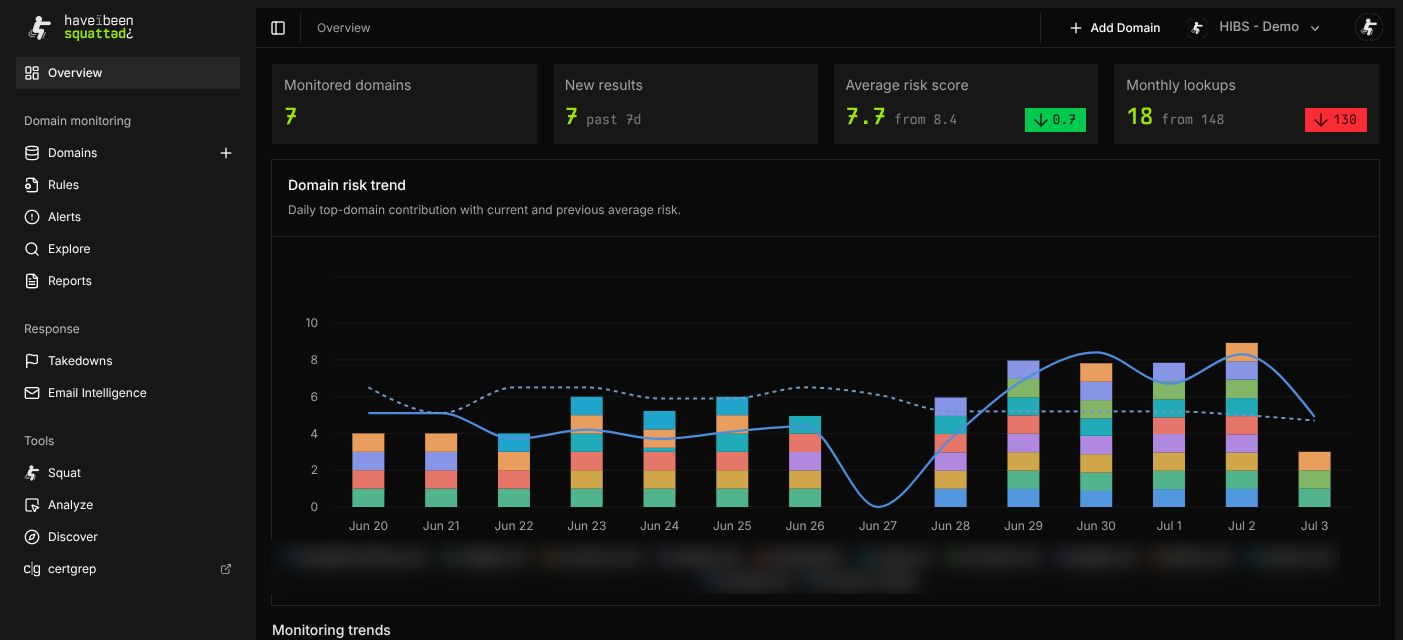
The console sidebar separates the main workflows:
- Overview summarizes monitored-domain coverage, new results, risk trend, and recent alerts.
- Domain monitoring contains Domains, Rules, Alerts, Explore, and Reports.
- Response contains takedowns and email intelligence when enabled for the organization.
- Tools runs ad hoc squat, analyze, and discover workflows outside scheduled monitoring.
- Settings manages account, application programming interface (API) keys, notifications, and activity logs.
Add the first monitored domain
Section titled “Add the first monitored domain”Open Domain monitoring > Domains and select Add Domain. Add the primary registrable domain, such as example.com, rather than a subdomain such as www.example.com.
Monitored domains are scanned on a schedule. Have I Been Squatted generates proactive permutations, enriches active results with Domain Name System (DNS), Hypertext Transfer Protocol (HTTP), Registration Data Access Protocol (RDAP), WHOIS, screenshot, classification, CT, and passive telemetry where available, then stores the results for review.
Read the overview
Section titled “Read the overview”After monitoring has data, open Overview. The page is designed for triage rather than exhaustive investigation.
- Monitored domains counts domains currently in the portfolio.
- New results counts recently observed lookup results.
- Average risk score summarizes current risk across monitored domains.
- Domain risk trend shows recent risk movement and top-domain contribution.
- Monitoring trends groups signal families such as matching favicons and recent registrations.
- Recent alerts lists high-priority detections produced by enabled rules.
Use Overview to decide where to investigate next, not as the source of every result field.
Review domains, results, and alerts
Section titled “Review domains, results, and alerts”Use Domains to review the portfolio, open a specific domain, inspect lookup results, and tune discovery settings. Use Alerts when the question is “what changed that needs attention?” rather than “what data exists for this domain?”
For broader questions, use Explore to query lookup history with Upsilon. For standing detections, create or tune rules in Rules Engine.
Use tools for one-off checks
Section titled “Use tools for one-off checks”The Tools section is separate from monitored-domain history:
- Squat runs an ad hoc typosquatting lookup.
- Analyze enriches a single domain.
- Discover focuses on unregistered or candidate domains.
- certgrep opens certificate transparency search.
Use tools for quick checks, support investigations, or a domain that should not be added to scheduled monitoring yet.
Configure administration surfaces
Section titled “Configure administration surfaces”Organization administrators should finish setup in Settings:
- Create scoped API keys for automation.
- Configure notification preferences.
- Review the activity log where audit logging is available.
- Confirm plan and feature access in the access control reference.