

Domain feed integration
A domain feed is a plain-text list of IOC domains. Have I Been Squatted hosts the list, and your firewalls, secure web gateways and DNS resolvers fetch it on a schedule. The Add to domain feed rule response adds each IOC domain a matched rule cites to the feed you choose. Your products then block those domains wherever they enforce the list.
This works with any product that can poll an external domain list over HTTPS. Have I Been Squatted needs no credentials for your products and never changes their configuration. You attach the feed to a policy once, in each product.
Prerequisites
Section titled “Prerequisites”- The network enforcement add-on on the Have I Been Squatted organization, and an organization admin to set up feeds.
- A product that can fetch a domain list from an HTTPS URL. See Supported products.
- Outbound HTTPS from that product to
feeds.haveibeensquatted.com.
Set up
Section titled “Set up”- In the app, open Connectors > Domain feed.
- Select Set up domain feeds.
- Select Create feed. Give the feed a name, for example
Branch firewalls, and optionally change its capacity (see Capacity). - Copy the feed URLs. The token in them is shown once. Store it as you would a password.
Create one feed per group of products that should block the same domains, up to 10 feeds per organization. In a rule’s response, switch on each feed the rule should add domains to.
Feed URLs
Section titled “Feed URLs”Each feed is available in seven formats. Pick the one your product or tool parses. The file name at the end of the URL selects the format.
| Format | File | Contents | Use for |
|---|---|---|---|
domains |
domains.txt |
example.com, one per line |
Products that reject wildcards |
wildcard |
wildcard.txt |
example.com and *.example.com for each domain |
Products that match a domain entry exactly |
adguard |
adguard.txt |
||example.com^, one per line |
AdGuard Home and other Adblock-syntax DNS filters |
csv |
domains.csv |
A domain,first_seen header and one row per domain |
CSV feeds, lookups and spreadsheets |
json |
domains.json |
One document: version, count and domains, each with first_seen |
Scripts and SOAR |
ndjson |
domains.ndjson |
One {"domain", "first_seen"} object per line |
Log shippers and streaming ingest |
stix |
domains.stix.json |
A STIX 2.1 bundle: one indicator and one domain-name object per domain |
Threat intelligence platforms that import STIX bundles |
first_seen is when a rule first added the domain to the feed, in UTC
(ISO 8601). No format includes rule names or identifiers.
The token can be part of the URL, or sent in the Authorization header as a
Bearer token or an HTTP Basic password:
https://feeds.haveibeensquatted.com/v1/<token>/<file>https://feeds.haveibeensquatted.com/v1/<file> Authorization: Bearer <token>https://feeds.haveibeensquatted.com/v1/<file> any username, password <token>Prefer a header form, so the token stays out of URLs your product may log. Most firewalls support a username and password for external lists, so use Basic there; scripts and threat intelligence platforms usually support Bearer. Use the URL form only when neither is available.
Text and NDJSON formats end with a newline and have no comments or header. A
feed with no domains yet is valid and empty in every format: an empty file, a
CSV header, a JSON document with no domains, or a STIX bundle holding only the
publisher’s identity. Responses carry an ETag, and products that send
If-None-Match receive 304 Not Modified when nothing changed.
X-Feed-Version names the version served.
STIX bundles
Section titled “STIX bundles”The bundle is a static file, not a TAXII server. Each indicator has the pattern
[domain-name:value = '<domain>'], valid_from set to first_seen, and no
valid_until, because entries never expire. Identifiers are stable: a domain
keeps the same indicator id in every version of the feed, and its
domain-name object uses the STIX 2.1 deterministic id, so a platform that
imports the bundle again updates objects instead of adding copies. A domain
that leaves the feed is absent from the next bundle; the bundle does not
revoke it, so configure your platform to replace, not merge, the feed’s
indicators on each import if it supports that.
Supported products
Section titled “Supported products”Have I Been Squatted publishes the list; each product decides how it matches and enforces it. Check your product’s documentation for how its domain list matches subdomains before choosing a format.
| Product | Format | Notes |
|---|---|---|
| Palo Alto Networks PAN-OS, Prisma Access | wildcard |
Add a Domain List external dynamic list and use it in DNS security policy. Supports a username and password. |
| Fortinet FortiGate, FortiSASE | wildcard or domains |
Add a Domain Name threat feed and block it in a DNS filter profile. Supports HTTP basic authentication. |
| Check Point | domains |
Import it as a custom intelligence feed or an IOC Management custom feed. |
| Sophos Firewall | domains |
Add it as a third-party threat feed. |
| Juniper SRX, Policy Enforcer | domains |
Add a custom feed. Junos url-feed files are capped at 512 KB, so lower the feed’s capacity to about 20,000. |
| Cisco Secure Firewall | domains |
Add a Security Intelligence DNS feed. Cisco documents no credentials for feeds, so use the URL form. |
| Infoblox Threat Defense | domains |
Add it as a custom feed. |
| OPNsense | wildcard |
Add it as an Unbound DNS blocklist URL. |
| AdGuard Home, pfBlockerNG | adguard |
Add it as a DNS blocklist. |
| MISP | domains or csv |
Add it as a freetext or CSV feed with a fixed event and Delta Merge. See MISP. |
Poll every 5 to 60 minutes. Have I Been Squatted publishes a new version within about a minute of a change. Each address can make up to 120 feed requests a minute.
MISP imports the feed as a freetext or CSV feed into one event. On each fetch, MISP adds the domains that are new to the feed. With Delta Merge, it also deletes the attributes of domains that left the feed, so the event matches the feed.
-
In MISP, open Sync Actions > Feeds and select Add Feed.
-
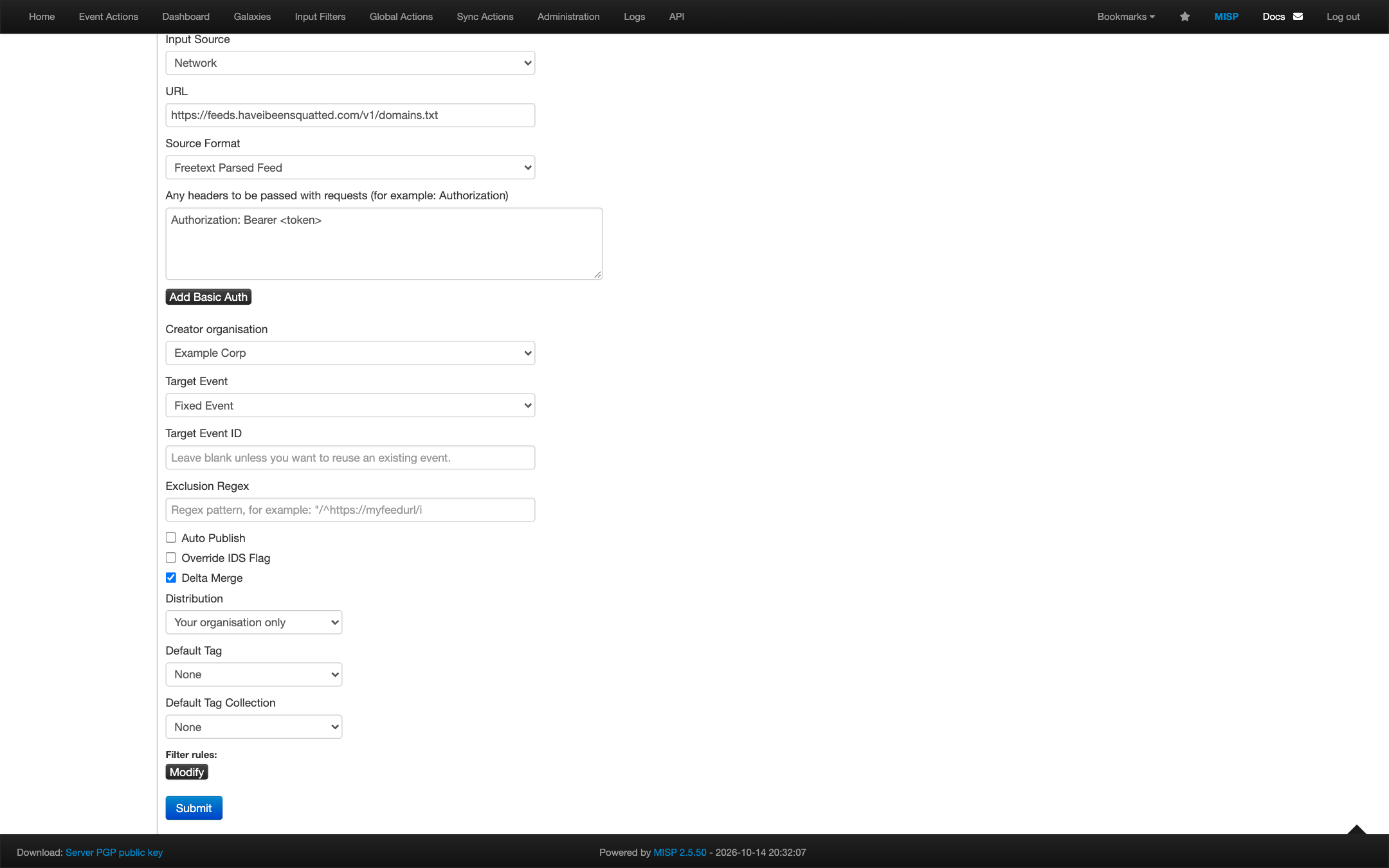
Fill in the form:
Field Value Enabled Selected Name A name, for example Have I Been SquattedProvider Have I Been SquattedInput Source NetworkURL https://feeds.haveibeensquatted.com/v1/domains.txtSource Format Freetext Parsed FeedAny headers to be passed Authorization: Bearer <token>Target Event Fixed EventTarget Event ID Empty. MISP creates the event on the first fetch. Auto Publish Selected only if other tools read the event from MISP once it is published Override IDS Flag Cleared, so each domain keeps the IDS flag and reaches IDS exports Delta Merge Selected Distribution Your organisation only, unless you mean to share the domains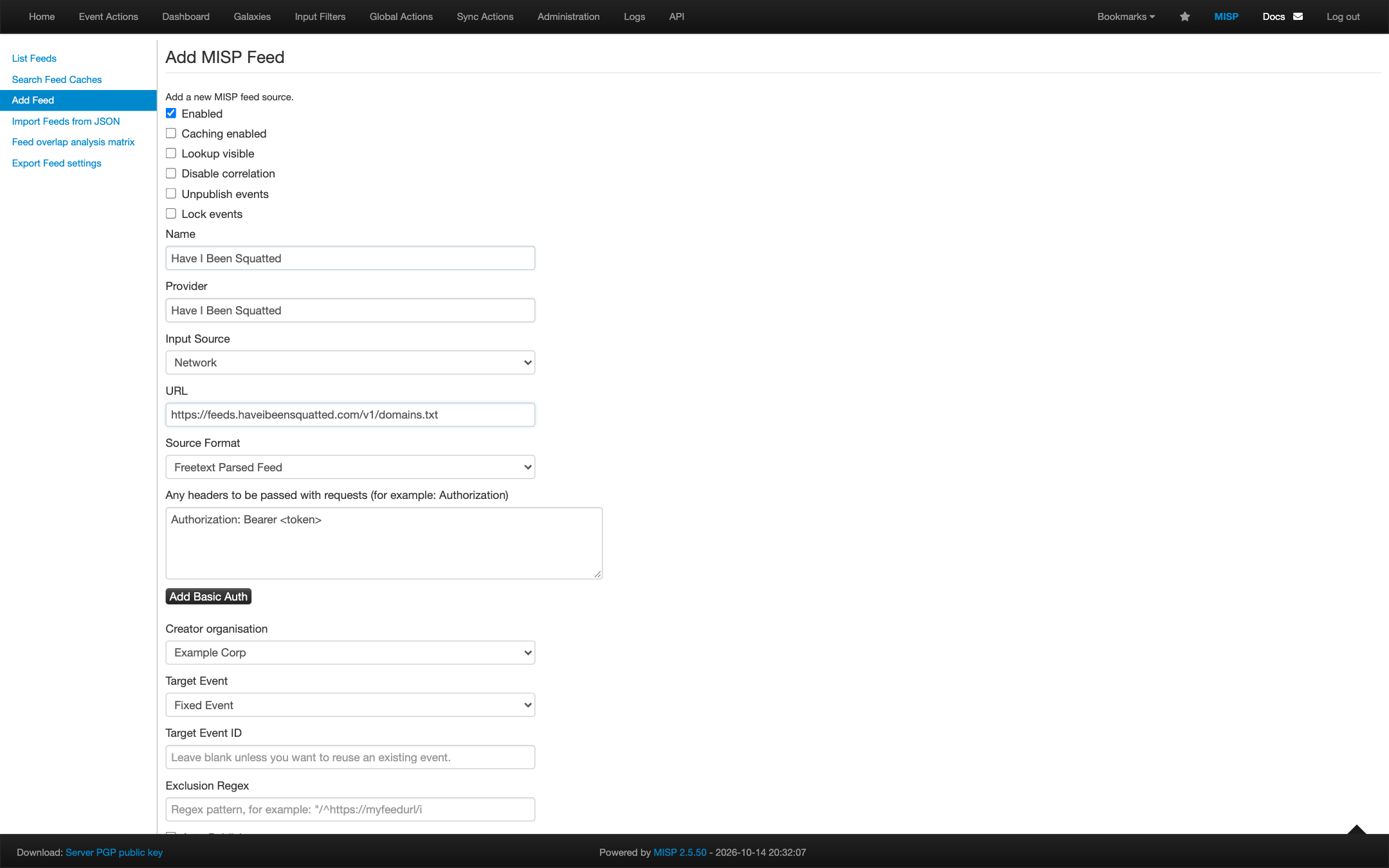
-
Select Submit.
-
On the feed list, select Fetch all events in the feed’s actions. MISP creates the event and adds one attribute per domain.
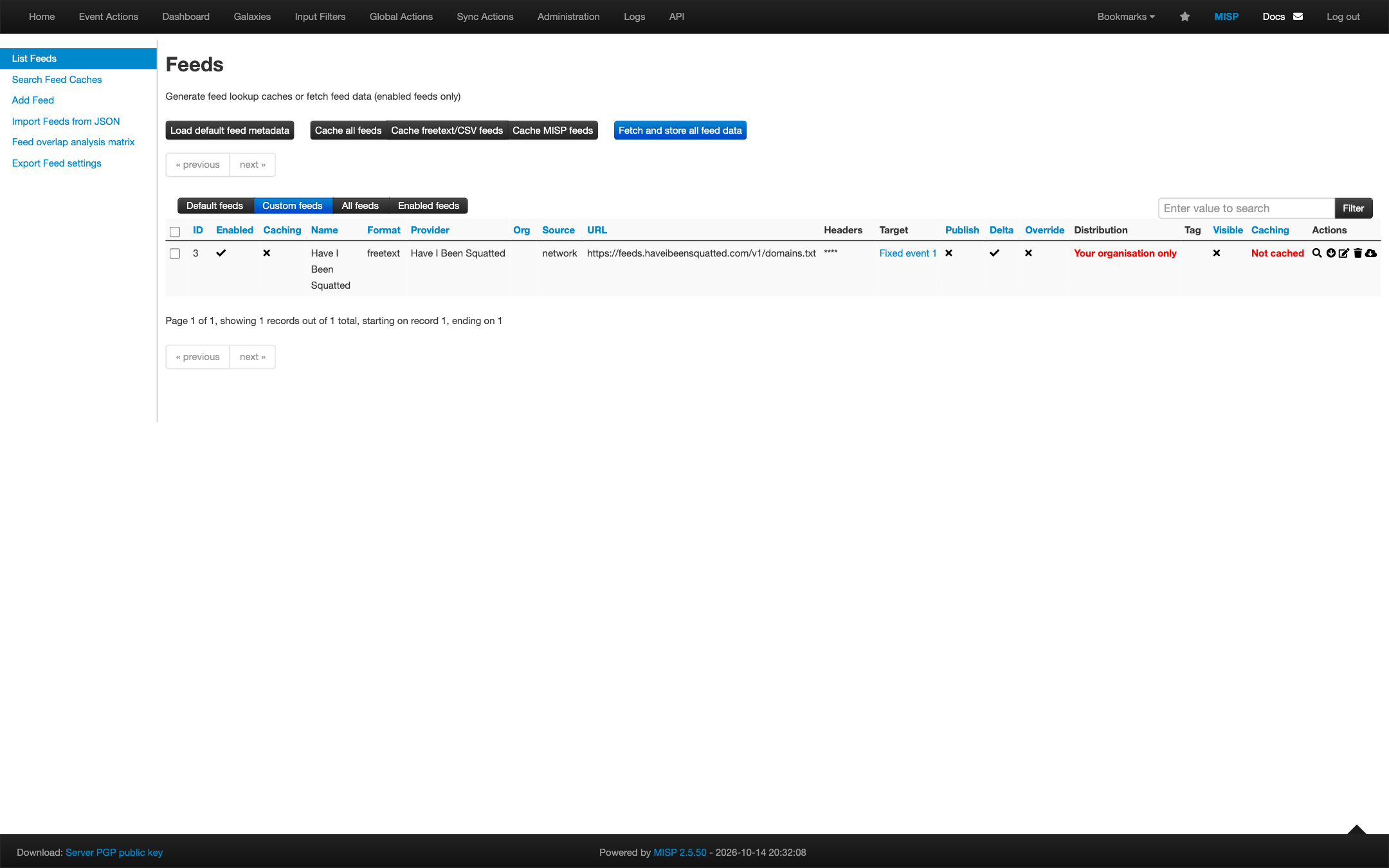
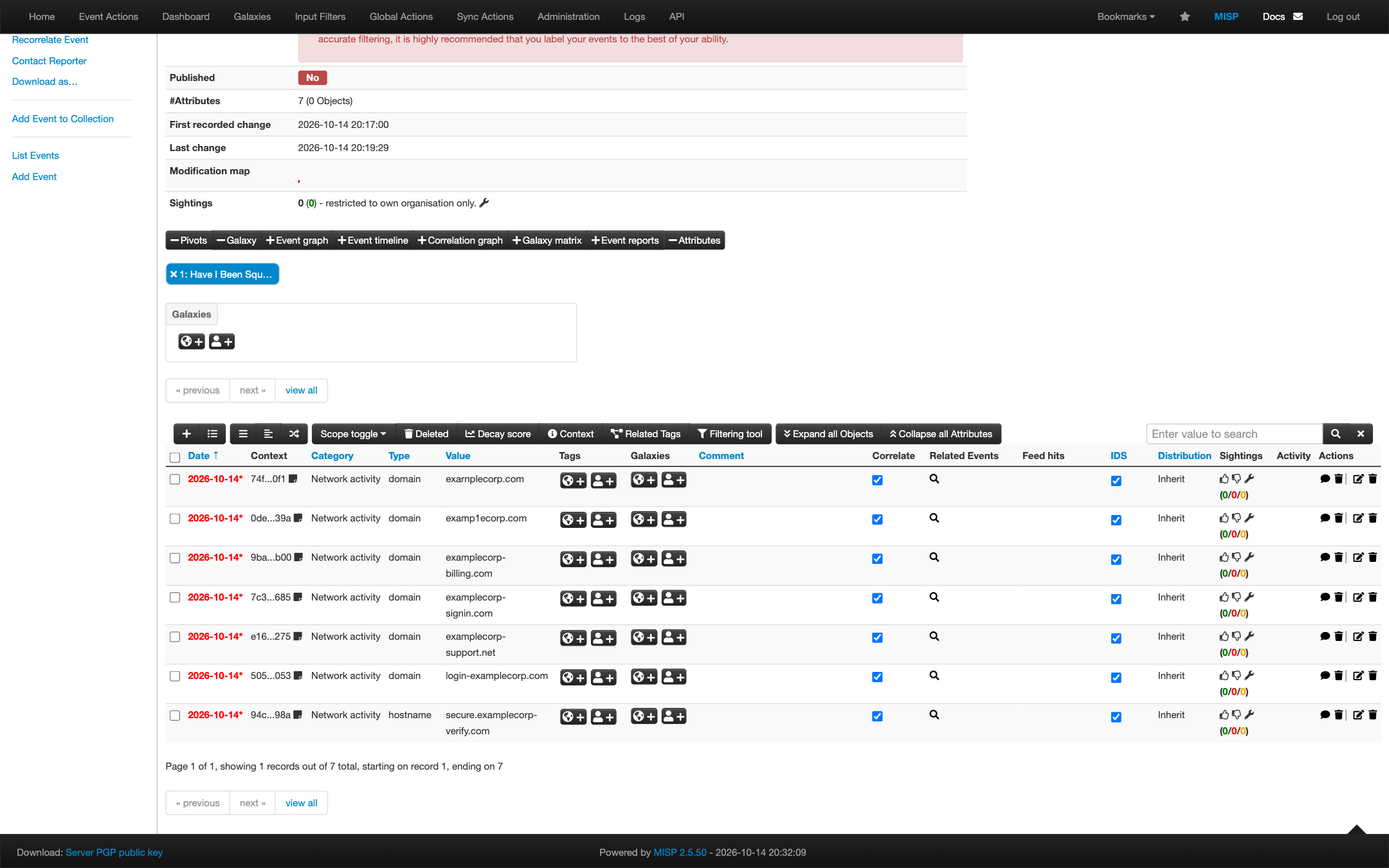
The event is named after the feed, for example Have I Been Squatted feed.
MISP stores a domain with two labels, such as example.com, as a domain
attribute, and a longer name, such as login.example.com, as a hostname
attribute, both with the IDS flag set. A domain whose top-level domain is not
on MISP’s list of TLDs is not imported.
To use the CSV format instead, set URL to
https://feeds.haveibeensquatted.com/v1/domains.csv, Source Format to
Simple CSV Parsed Feed and Value field(s) in the CSV to 1. MISP then
imports the same attributes and ignores the header row and the first_seen
column.
MISP fetches every enabled feed on the Feed fetch task in
Administration > Scheduled Tasks. Set its frequency to between 300 and
3600 seconds. MISP reuses a fetched freetext or CSV feed for 10 minutes, then
sends If-None-Match, so an unchanged feed costs one 304 response.
Add the response to a rule
Section titled “Add the response to a rule”- Create or edit a rule and open the Response tab.
- Select Add action > Add to domain feed.
- Switch on each feed the rule should add domains to.
- Save the rule.
The response needs at least one domain condition in the rule, because only cited domain records produce entries.
What is added
Section titled “What is added”For each active rule alert that cites domain records, Have I Been Squatted adds each distinct cited domain, up to 10 per alert, to the feed. A domain already in the feed is marked as cited again instead.
- Only domains from cited domain (permutation) records are added.
- The monitored domain and its subdomains are never added.
- Email and canary evidence never produce entries.
Capacity
Section titled “Capacity”Entries never expire, because an expiring block could lift just before a malicious domain is used again. Instead, each feed holds at most its capacity of domains, as a queue ordered by when a rule last cited each one:
- A new domain joins the head of the queue.
- A domain cited again moves back to the head.
- When the feed is full, each new domain removes the domain least recently cited.
The capacity is 50,000 by default and can be set from 100 to 100,000. Lower it
when a product holds fewer entries: Junos url-feed files are capped at
512 KB, and Palo Alto Networks firewalls hold from 50,000 external dynamic list
entries upward, depending on the model, shared across all their lists. The
wildcard format uses two entries per domain. Lowering the capacity removes
the least recently cited domains at once.
Tokens
Section titled “Tokens”Each feed has at most two active tokens, so you can rotate without a gap:
- Select Create token, and copy the new URLs.
- Update every product that fetches the feed.
- Once the old token’s last fetch is older than your products’ poll interval, select Revoke on it.
A revoked token stops working immediately. Have I Been Squatted stores only a hash of each token and the last four characters, so a lost token cannot be shown again; rotate instead.
Consumers
Section titled “Consumers”Each feed lists its consumers, the products that fetched it: the address, the user agent, when it last fetched, the version it received and how many times. Up to 50 consumers are listed per token, and consumers that have not fetched for 30 days are removed.
A fetch shows that a product downloaded a version of the feed. It does not show that the product enforces it. To confirm enforcement, check your product’s logs for a blocked request to a domain in the feed.
Disable or delete a feed
Section titled “Disable or delete a feed”- Disable stops rules from adding domains. The feed keeps being served with its current domains, so your products keep blocking them.
- Revoke every token to stop serving the feed.
- Delete removes the feed, its domains and its tokens. Products fetching
it receive
404 Not Found. Products differ in whether they keep their last downloaded list after a failed fetch, so remove the feed from them too.